Introduction
AltDot is a lightweight Windows utility that sits in the system tray and lets you toggle hidden files and file extensions instantly — with a right-click menu or global keyboard shortcuts, no window needed.
- Show / hide hidden files
- Show / hide file extensions
- Toggle protected system files visibility
- Global keyboard shortcuts
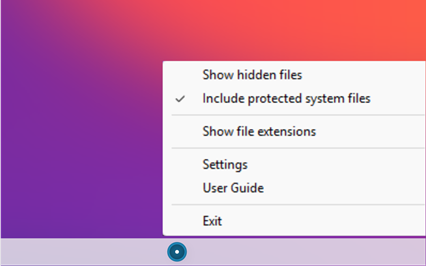
Tray Menu
AltDot is located in the system tray. Right-clicking the icon displays the menu options. Double-clicking the icon toggles hidden files on/off.
Show hidden files — this option appears when hidden files are not visible. Selecting it makes them visible in Explorer.
Hide hidden files — this option appears when hidden files are visible. Selecting it hides them.
Include protected system files — when hidden files are visible, protected system files may or may not be shown depending on the selection made here.
Show file extensions — this option appears when file extensions are not visible. Selecting it makes them visible.
Hide file extensions — this option appears when file extensions are visible. Selecting it hides them.
Hotkeys
Global keyboard shortcuts work at any time, regardless of which application is in focus.
-
 Toggle hidden files on / off
-
 Toggle file extensions on / off
Settings
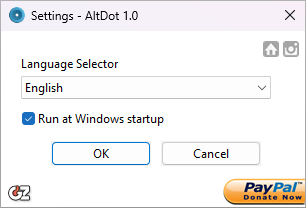
The settings window lets you select the language for AltDot and choose whether it runs at Windows startup.
It also provides links to the GDZ Software website, the AltDot website, and to PayPal for making a donation.
Press OK to save the changes, or Cancel to discard them.
Features
- Show / hide hidden files
- Show / hide file extensions
- Toggle protected system files visibility
- Global hotkeys: Alt+. for hidden files, Shift+Alt+. for file extensions
- Double-click tray icon to toggle hidden files instantly
- Run at startup option
- Installer and portable versions
- Languages: English, French, Spanish, Italian, Portuguese, German, Russian, Korean, Chinese, Dutch
- Windows 10 64-bit, version 1909 or above